
Master Your Stride: AI Hip Drop Analysis & Strengthening

When you run, your hip muscles work overtime to keep your pelvis steady. If they are weak, one side can drop as you lift the opposite leg to step. This hip drop, or contralateral pelvic drop, is a major contributor to runner's knee, IT band syndrome, and shin splints.

AlphaPeak logo

Measure pelvic control accurately, understand the risk, and follow the right strengthening plan.

Our browser-based AI tool measures hip drop so you can move from guesswork to a clear plan. This page walks you through all eight steps, from treadmill setup and recording through result interpretation and targeted exercise routines.

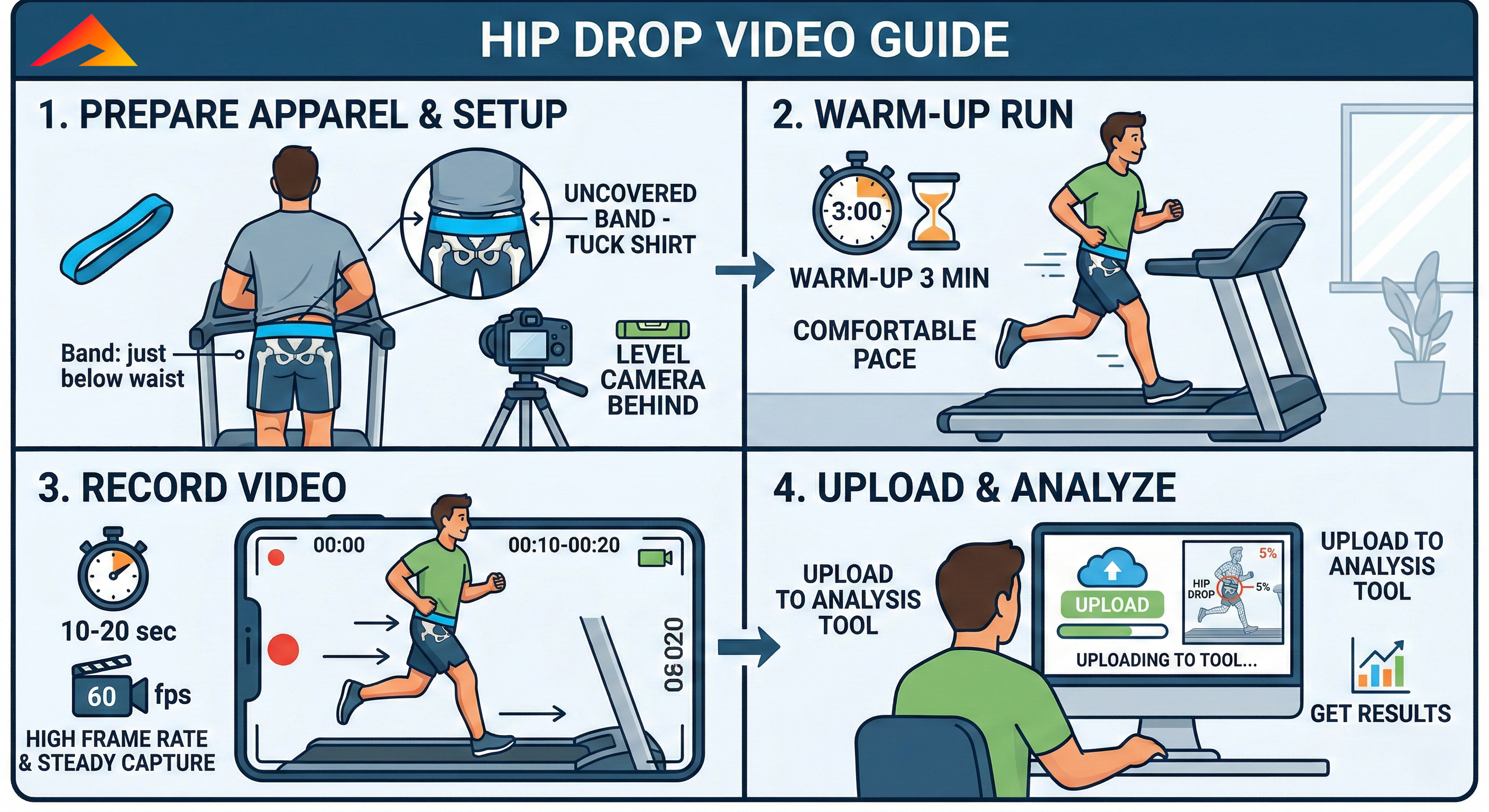
Hip drop setup, warm-up, recording, and upload steps

Phase 1: Capture Your Run

Steps 1-4: Set up the band, record clean footage, and upload for analysis.

Follow these four steps to get a usable reading. The quality of the hip drop result depends heavily on clean camera position, visible landmarks, and a consistent treadmill effort.

Step 1: Prepare Apparel & Setup

Place a resistance band firmly around your pelvic area, just below your waist. Keep your shirt tucked in and make sure no clothing covers the band so the AI can detect it clearly.

Set your phone or camera on a tripod directly behind the treadmill, level with your hips.

Step 2: Warm-Up Run

Warm up on the treadmill for exactly 3 minutes at your comfortable, normal long-run pace before you begin recording.

Step 3: Record Video

Capture 10 to 20 seconds of footage. For the best AI tracking, set the camera to 60 fps whenever possible.

Step 4: Upload & Analyze

Upload the video directly into the browser tool. The AI processes your biomechanics in seconds and returns a hip drop percentage.
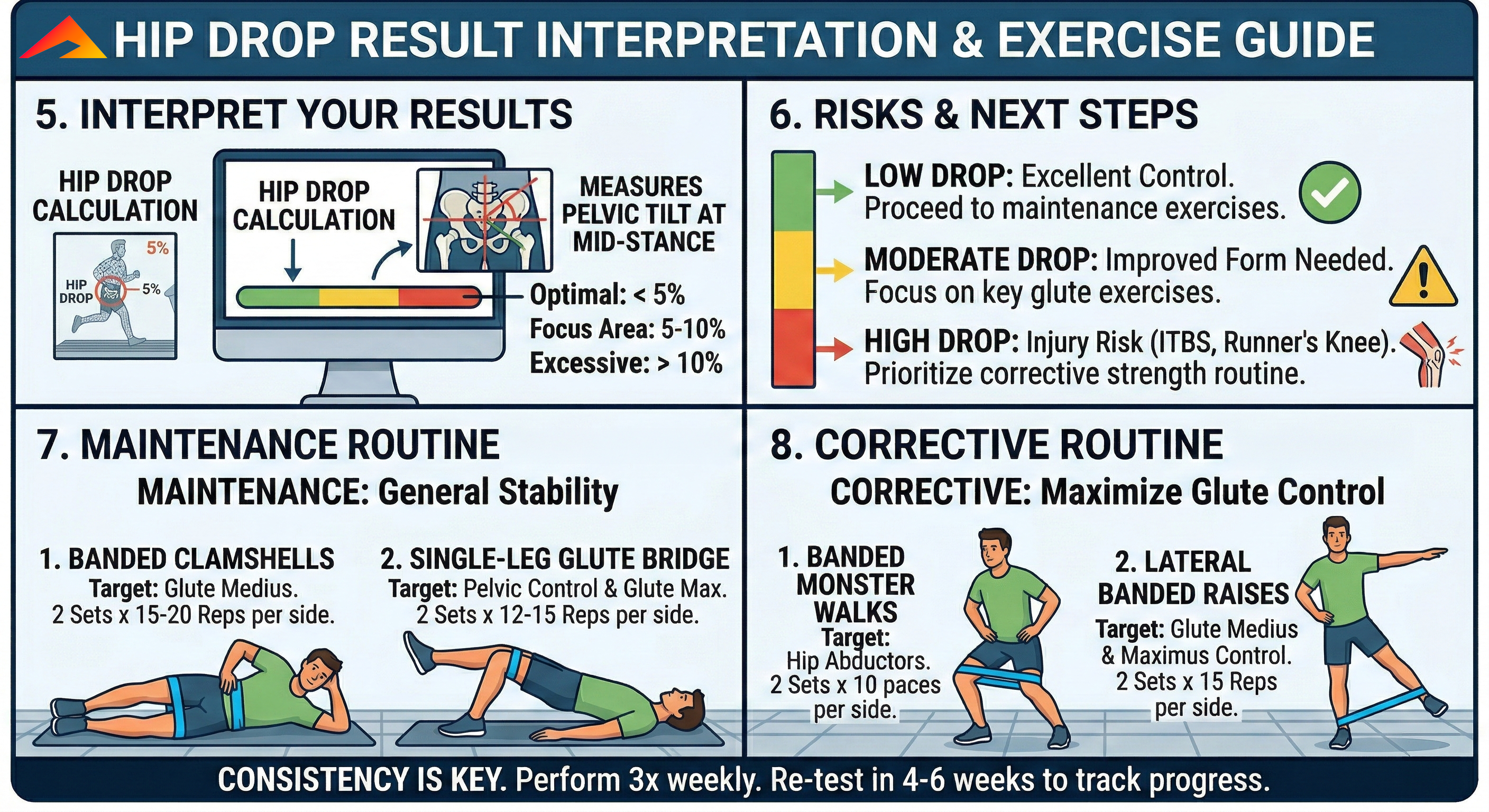
Hip drop interpretation and risk guidance

Phase 2: Understand Your Metrics

Steps 5-6: Interpret the score, understand risk, and choose the right next move.

The AI measures pelvic tilt at mid-stance. Once you have the result, the real value is knowing what band of control you fall into and what that means for injury prevention and follow-up work.

Step 5: Interpret Your Calculation

  • Optimal (Green): less than 5% drop.
  • Focus Area (Yellow): 5% to 10% drop.
  • Excessive (Red): greater than 10% drop.

Each 1% increase in hip drop corresponds to an estimated 80% increased risk of injury.

Step 6: Risks & Next Steps

  • Low Drop: strong control, so maintain it.
  • Moderate Drop: improve form and focus heavily on glute work.
  • High Drop: elevated risk for ITBS and runner's knee, so start corrective work immediately.

This is the decision point: low scores move into maintenance, while moderate and high scores should shift attention toward targeted glute strengthening and re-testing.

Phase 3: Actionable Routines

Steps 7-8: Match your routine to the result and re-test in 4 to 6 weeks.

Perform these routines three times per week, then re-test your hip drop after 4 to 6 weeks to confirm the change is translating into better pelvic control on video.

Step 7: Maintenance Routine

Build general stability to keep your stride efficient.

  • Banded Clamshells: 2 sets x 15-20 reps per side. Lie on your side with the band above the knees and open the top knee while keeping the hips steady. Targets glute medius.
  • Single-Leg Glute Bridge: 2 sets x 12-15 reps per side. One foot flat, opposite leg extended, then lift and lower the hips with control. Targets pelvic control and glute maximus.

Step 8: Corrective Routine

Maximize glute control to aggressively reduce pelvic tilt.

  • Banded Monster Walks: 2 sets x 10 paces per side. Band around the ankles, slight squat, then step sideways while maintaining tension. Targets hip abductors.
  • Lateral Banded Raises: 2 sets x 15 reps per side. Stand with the band around the ankles and lift one leg directly out to the side with control. Targets glute medius and glute maximus control.
Hip drop strengthening and corrective routine steps