
Own the Bottom Position: AI Squat Analysis & Feedback

The Jump + Squat Field Test app in /squat uses local pose processing to score double-leg and single-leg squat clips. This page explains how to record a clean rep and how to interpret the depth, symmetry, and control metrics in the report.

AlphaPeak logo

Select a squat protocol, calibrate with athlete height, and turn one rep into depth, timing, and control feedback.

The squat modes focus on usable depth, knee tracking, pelvic control, and balance through the bottom position. After analysis, the app can generate a PDF report with summary metrics, coaching priorities, and a QR link back to this instructions page.

Instructions for recording videos for the Squat app

Capture Setup

Record one clean squat rep so the app can see the full descent, bottom, and return.

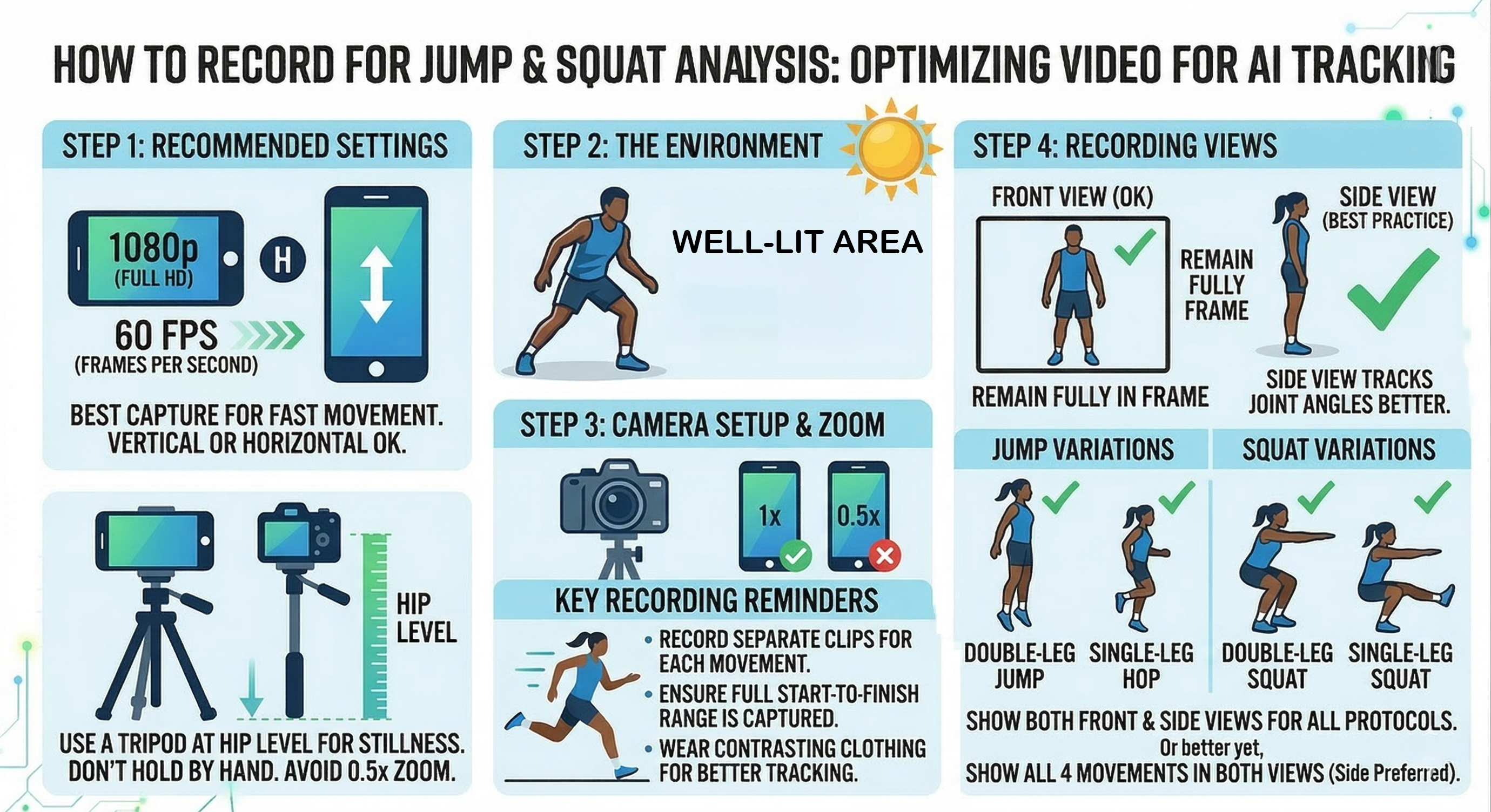
  • Step 1: Recommended Settings. Record at 1080p and 60 fps. Keep the whole body visible from feet to head for the full rep.
  • Step 2: The Environment. Use bright, even lighting with minimal shadows so the pose model can keep the knees, hips, and shoulders tracked clearly.
  • Step 3: Camera Setup. Place the camera on a tripod around waist height. Do not hand-hold the phone because camera shake makes bottom-position metrics less reliable.
  • Step 4: Best View. For both double-leg and single-leg squats, a straight-on front view is preferred so knee separation, pelvic tilt, and trunk shift can be measured from the same angle.
  • Step 5: Rep Selection. Start tall, descend under control, reach your true bottom, and stand back up without stepping out of frame. For single-leg squat, record one side at a time with the non-stance foot clearly off the floor.

Enter athlete height in meters before reviewing the report. That calibrates the pixel-to-meter scaling used for squat depth, center-of-mass travel, and distance-based alignment measures.
Squat analysis metrics and coaching feedback

Metric Breakdown

Read the squat report from overall depth first, then work outward to symmetry and control.

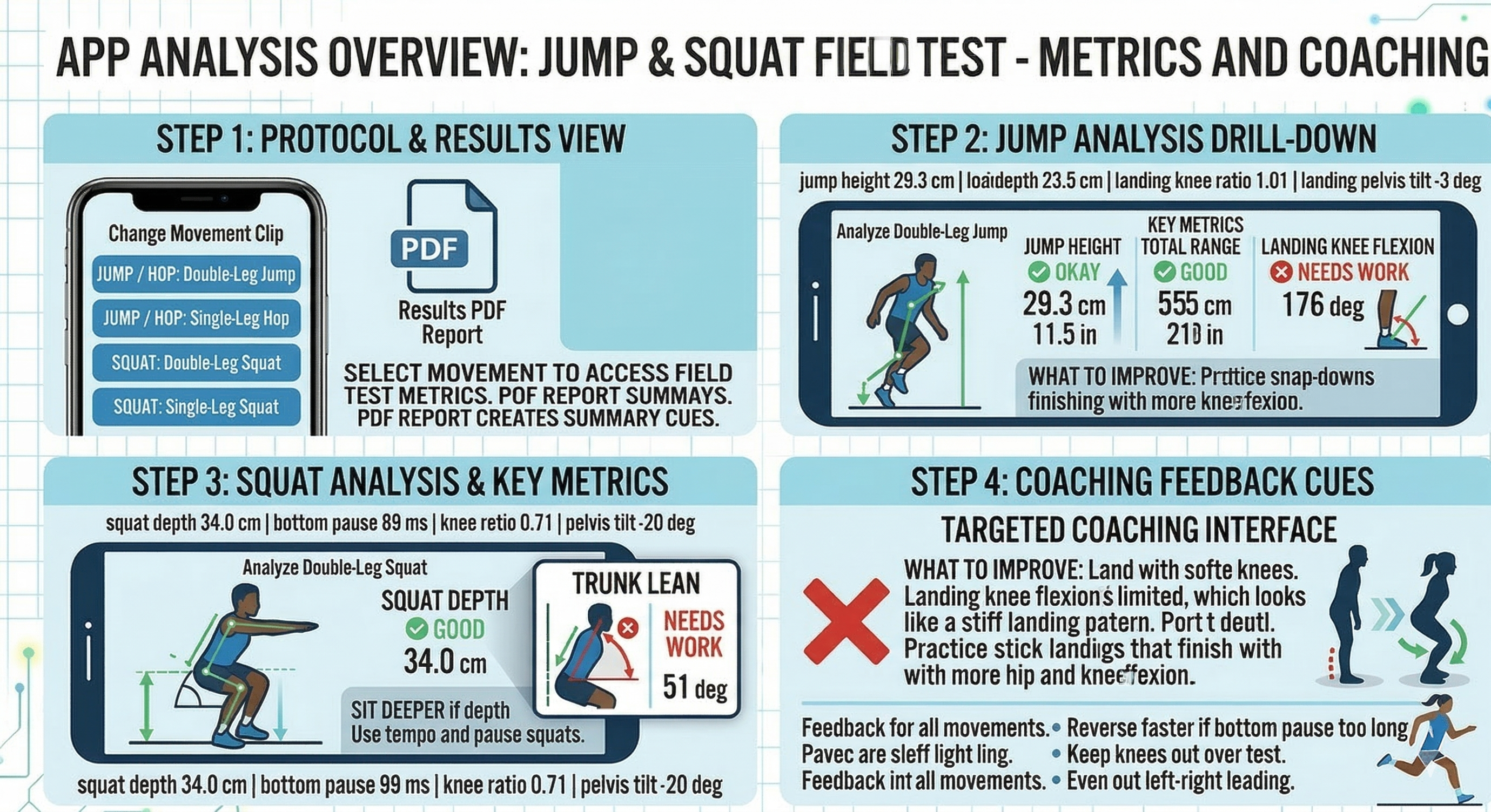
A double-leg sample can read squat depth 34.0 cm, bottom pause 89 ms, knee ratio 0.71, and pelvis tilt -20 deg. A single-leg sample may read right support, squat depth 15.6 cm, bottom pause 141 ms, and pelvis tilt +44 deg. The numbers matter most when you understand what each one says about the bottom position.

Squat Depth

34.0 cm

Center-of-mass drop from the start to the deepest position. More depth is only useful if the athlete can keep knee and pelvis control as the squat gets lower.

Bottom Pause

89 ms

Time spent near the transition at the bottom. A long pause often means the athlete is sitting into the position instead of moving smoothly through it.

Knee Separation Ratio

0.71

Knee width divided by foot width at the bottom. Closer to 1.0 usually means the knees are staying out over the feet instead of collapsing inward.

Pelvis Tilt

-20 deg

Signed pelvic angle at the bottom. A larger tilt suggests uneven loading, pelvic drop, or loss of level control as the athlete reaches depth.

Support-Side Control

Right Support

Single-leg squat mode auto-detects the working side, then scores support-knee flexion, knee-over-foot drift, and center-of-mass control on that leg.

Trunk Lean

39-51 deg

How far the torso drifts off vertical at the bottom. High trunk lean usually shows up when the athlete compensates for limited depth, balance, or stance-leg strength.

Individualized Feedback

The coaching section changes based on whether the problem is depth, alignment, or balance.

After the app scores the rep, it turns the largest breakdowns into coaching priorities. Double-leg squat reports tend to emphasize depth and left-right symmetry, while single-leg squat reports shift toward knee stacking, pelvic control, and trunk balance over the stance leg.

Example squat report with individualized improvement focus